Last updated: April 2026 · AnomixLabs Technical Team
HTTPS is no longer an option, it's a requirement. Google has been marking HTTP sites as 'Not Secure' since 2018. With Let's Encrypt, this is free and automatic.
1. Why Let's Encrypt?
Let's Encrypt is a free, automated, and open Certificate Authority established in 2016, issuing over 3 billion active certificates annually. Supporters include Mozilla, EFF, Cisco, and Google. Compared to alternatives (Comodo, DigiCert), it offers: free certificates, 90-day validity, full automation, and DV (Domain Validation) certificates.
2. Nginx and Certbot Installation
# Ubuntu 22.04 / 24.04
$ sudo apt update
$ sudo apt install nginx
$ sudo systemctl enable nginx

# Certbot — snap package (recommended, up-to-date for all OS)
$ sudo snap install --classic certbot
$ sudo ln -s /snap/bin/certbot /usr/bin/certbot

# Verify Certbot version
$ certbot --version
# certbot 2.x.x
3. Firewall (UFW) Configuration
Before obtaining a certificate, Certbot requires the server's port 443 to be accessible externally. The default firewall on Ubuntu is UFW:
# Secure SSH access — do this FIRST!
$ sudo ufw allow ssh

# Enable UFW
$ sudo ufw enable

# Add Nginx profile for HTTP (80) + HTTPS (443)
$ sudo ufw allow 'Nginx Full'

# No longer need the HTTP-only rule
$ sudo ufw delete allow 'Nginx HTTP'

# Verify status
$ sudo ufw status
Expected output:
Status: active

To                         Action      From
--                         ------      ----
OpenSSH                    ALLOW       Anywhere
Nginx Full                 ALLOW       Anywhere
OpenSSH (v6)               ALLOW       Anywhere (v6)
Nginx Full (v6)            ALLOW       Anywhere (v6)
Critical warning: Always run allow ssh before executing ufw enable. Otherwise, your current SSH session will be terminated, and you will lose access to your server. You won't forget this after experiencing it once.
4. Obtaining an SSL Certificate: Nginx Plugin
# Get certificate and update Nginx configuration in one command
$ sudo certbot --nginx -d orneksite.com -d www.orneksite.com

# Successful output:
# Successfully received certificate.
# Certificate is saved at: /etc/letsencrypt/live/orneksite.com/fullchain.pem
# Key is saved at: /etc/letsencrypt/live/orneksite.com/privkey.pem
# This certificate expires on 2026-07-15
5. Nginx Configuration (Post-Certbot)
server {
    listen 80;
    server_name orneksite.com www.orneksite.com;
    return 301 https://$host$request_uri;  # HTTP → HTTPS redirect
}

server {
    listen 443 ssl http2;
    server_name orneksite.com www.orneksite.com;

    ssl_certificate /etc/letsencrypt/live/orneksite.com/fullchain.pem;
    ssl_certificate_key /etc/letsencrypt/live/orneksite.com/privkey.pem;
    include /etc/letsencrypt/options-ssl-nginx.conf;
    ssl_dhparam /etc/letsencrypt/ssl-dhparams.pem;

    # OCSP Stapling
    ssl_stapling on;
    ssl_stapling_verify on;
    resolver 8.8.8.8 8.8.4.4 valid=300s;

    # HSTS
    add_header Strict-Transport-Security 'max-age=31536000; includeSubDomains; preload' always;

    location / {
        include proxy_params;
        proxy_pass http://unix:/run/gunicorn.sock;
    }
}
6. Automatic Renewal
Let's Encrypt certificates are valid for 90 days. The Certbot snap package sets up an automatic timer during installation. Manual verification:
# Check remaining validity
$ sudo certbot certificates

# Simulate renewal (does not actually renew)
$ sudo certbot renew --dry-run

# Check systemd timer
$ sudo systemctl status snap.certbot.renew.timer

# Manual renewal (if necessary)
$ sudo certbot renew --force-renewal
7. Wildcard Certificate (DNS Challenge)
For a certificate covering all subdomains like *.orneksite.com, the DNS-01 challenge is required. This involves adding a TXT record with your domain provider:
# Wildcard — for all subdomains
$ sudo certbot certonly --manual \
    --preferred-challenges dns \
    -d orneksite.com \
    -d '*.orneksite.com'

# You will be prompted to add a DNS TXT record:
# _acme-challenge.orneksite.com → [provided value]

# Automatic for Cloudflare users:
$ pip install certbot-dns-cloudflare
$ certbot certonly --dns-cloudflare --dns-cloudflare-credentials creds.ini \
    -d orneksite.com -d '*.orneksite.com'
8. Cloudflare Flexible SSL Danger
Warning: Do not use Cloudflare's 'Flexible SSL' mode. In this mode, the connection between your browser and Cloudflare is HTTPS, but the connection between Cloudflare and your server is HTTP. Your server cannot achieve an SSL Labs A+ score without a Let's Encrypt certificate, and user data is not encrypted on the last mile. Always use 'Full (strict)' mode.
9. Django settings.py HTTPS Security Settings
# In production environment (DEBUG=False)
SECURE_SSL_REDIRECT = True
SECURE_HSTS_SECONDS = 31536000  # 1 year
SECURE_HSTS_INCLUDE_SUBDOMAINS = True
SECURE_HSTS_PRELOAD = True
SESSION_COOKIE_SECURE = True
CSRF_COOKIE_SECURE = True
SECURE_PROXY_SSL_HEADER = ('HTTP_X_FORWARDED_PROTO', 'https')
SECURE_REFERRER_POLICY = 'same-origin'
SECURE_CONTENT_TYPE_NOSNIFF = True
X_FRAME_OPTIONS = 'DENY'
10. Let's Encrypt Rate Limits
Caution: Let's Encrypt enforces a limit of 5 certificates per domain per week. To avoid hitting this limit during testing, use the staging environment:
# Staging (test) environment — no real rate limits
$ sudo certbot --nginx --staging -d test.orneksite.com

# Staging certificates will trigger browser warnings but are functional
11. SSL Labs A+ Score Verification
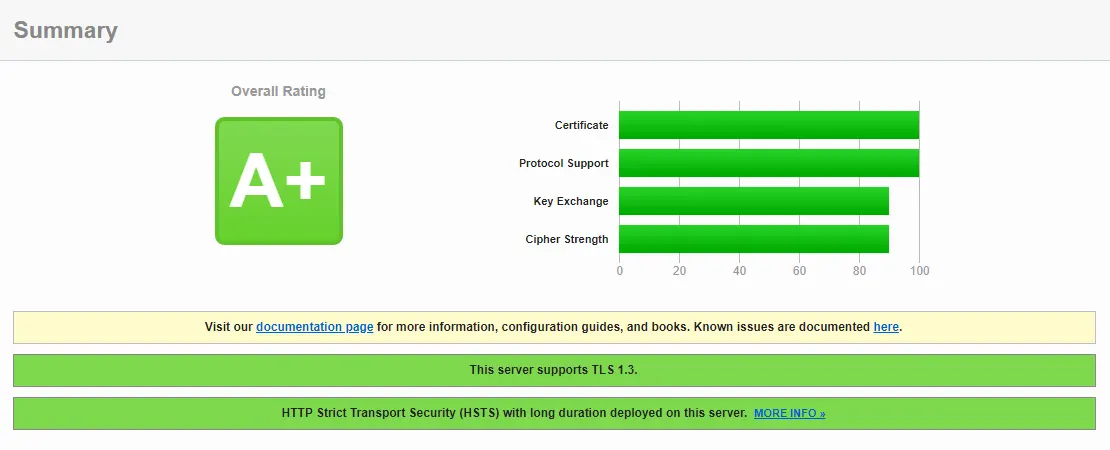
Test your domain's SSL configuration at ssllabs.com/ssltest/. To achieve an A+ score, you need TLS 1.2 and 1.3 protocols, strong cipher suites, HSTS preload, and OCSP stapling. Certbot's default configuration meets most of these requirements.
Summary
Let's Encrypt + Certbot + Nginx: free, automated, and industry-standard SSL. Achieve an A+ score in 10 minutes on Ubuntu 24.04 with snap. Complete the SECURE_* settings in Django and use Cloudflare Full Strict mode.
Frequently Questions
Why does an SSL certificate renew every 90 days? expand_more
Does SECURE_SSL_REDIRECT = True cause issues behind Nginx? expand_more
What is the difference between a wildcard certificate and a standard certificate? expand_more
What happens if certificate renewal fails? expand_more
Can I get a certificate for an IP address? expand_more
What is OCSP Stapling and why does it matter? expand_more
Are there free SSL alternatives to Let's Encrypt? expand_more
Ali Kasımoğlu
Full-stack Developer & Founder of AnomixLabs
A software developer specializing in the Python and Django ecosystem. Focuses on modern web architectures, AI integrations, and minimalist user experiences. Under the AnomixLabs umbrella, he aims to transform complex problems into lean and effective digital solutions.