Last updated: April 2026 · AnomixLabs Technical Team
Building a multilingual Django project is a more systematic process than it might seem, with the right tools. Gettext for UI texts, django-parler for database content — together they form a perfect solution.
1. Core Concepts: i18n, L10n, and G11n
Internationalization (i18n) is the process of preparing software to be adaptable to different languages and regions. Localization (L10n) is filling that prepared infrastructure for a specific language/region. Globalization (G11n) is the overarching concept encompassing both. Django supports both natively; no extra infrastructure is needed.
In practice, you'll need two separate layers: static text translation (button labels, error messages — with gettext) and database content translation (article titles, product descriptions — with django-parler).
2. Django 5.x settings.py i18n Configuration
It is critical for LocaleMiddleware to come after SessionMiddleware and before CommonMiddleware. If the order is incorrect, language detection will not work:
LANGUAGE_CODE = 'tr'
TIME_ZONE = 'Europe/Istanbul'
USE_I18N = True
USE_L10N = True
USE_TZ = True

LANGUAGES = [
    ('tr', 'Türkçe'),
    ('en', 'English'),
]

LOCALE_PATHS = [BASE_DIR / 'locale']

MIDDLEWARE = [
    'django.middleware.security.SecurityMiddleware',
    'django.contrib.sessions.middleware.SessionMiddleware',
    'django.middleware.locale.LocaleMiddleware',  # ← this order is critical
    'django.middleware.common.CommonMiddleware',
    '...',
]

INSTALLED_APPS = [
    '...',
    'parler',
    'rosetta',
]
3. Gettext Setup
Ubuntu/Debian:
$ sudo apt install gettext

# Verify
$ msginit --version
Windows: Download the 64-bit installer from mlocati.github.io and add it to your PATH. Then verify with msginit --version.
4. makemessages and compilemessages
# Scan all Python and template files, create .po files
$ python manage.py makemessages -l en
$ python manage.py makemessages -l tr

# After editing .po files, compile them to .mo
$ python manage.py compilemessages

# Scan only a specific directory
$ python manage.py makemessages -l en --ignore=venv/*

# To automate in a CI/CD pipeline:
$ python manage.py compilemessages --ignore=.venv
5. Model and Form Translations (gettext_lazy)
Use gettext_lazy for texts hardcoded in the code, such as model field verbose names and form labels. The shorthand _('...') is standard:
from django.utils.translation import gettext_lazy as _

class Product(models.Model):
    name = models.CharField(
        verbose_name=_('Product Name'),
        max_length=200,
    )
    price = models.DecimalField(
        verbose_name=_('Price'),
        max_digits=10, decimal_places=2,
    )

    class Meta:
        verbose_name = _('Product')
        verbose_name_plural = _('Products')
6. Template Translations
{% load i18n %}

{# Simple translation #}
{% translate "Welcome" %}

{# Translation with variables #}
{% blocktranslate with name=user.name %}
  Hello, {{ name }}!
{% endblocktranslate %}

{# Pluralization #}
{% blocktranslate count counter=items|length %}
  {{ counter }} item
{% plural %}
  {{ counter }} items
{% endblocktranslate %}
7. URL Structure: i18n_patterns
from django.conf.urls.i18n import i18n_patterns
from django.urls import path, include

urlpatterns = [
    path('i18n/', include('django.conf.urls.i18n')),  # set_language view
] + i18n_patterns(
    path('', views.HomeView.as_view(), name='home'),
    path('about/', views.AboutView.as_view(), name='about'),
    path('blog/', include('blog.urls')),
    prefix_default_language=False,  # Hide the /en/ prefix
)
8. django-parler: Database Content Translation
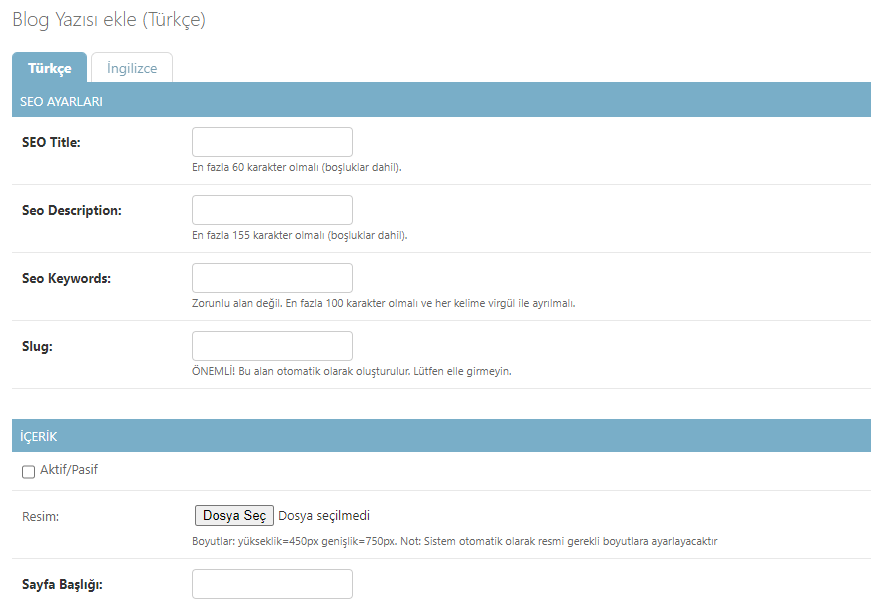
Gettext is sufficient for UI texts; however, django-parler is necessary to translate dynamic database content. Parler creates a separate translation table for each translatable model:
$ pip install django-parlerPARLER_LANGUAGES = {
1: (
{'code': 'tr'},
{'code': 'en'},
),
'default': {
'fallback': 'tr',
'hide_untranslated': False,
},
}from parler.models import TranslatableModel, TranslatedFields
class Article(TranslatableModel):
translations = TranslatedFields(
title=models.CharField(max_length=200),
slug=models.SlugField(unique=True),
content=models.TextField(),
summary=models.TextField(blank=True),
)
author = models.ForeignKey('auth.User', on_delete=models.CASCADE)
created_at = models.DateTimeField(auto_now_add=True)
def __str__(self):
return self.safe_translation_getter('title', any_language=True)9. TranslatableAdmin
from parler.admin import TranslatableAdmin

@admin.register(Article)
class ArticleAdmin(TranslatableAdmin):
    list_display = ['title', 'author', 'created_at']
    # Language tabs appear automatically in the admin panel
10. DetailView with TranslatableSlugMixin
from parler.views import TranslatableSlugMixin
from django.views.generic import DetailView

class ArticleDetailView(TranslatableSlugMixin, DetailView):
    model = Article
    template_name = 'article_detail.html'
    # The slug field is automatically resolved based on the active language
11. Template: Language Switching Widget
{% load i18n %}

  {% csrf_token %}


    {% get_current_language as LANGUAGE_CODE %}
    {% get_available_languages as LANGUAGES %}
    {% for lang_code, lang_name in LANGUAGES %}

        {{ lang_name }}

    {% endfor %}
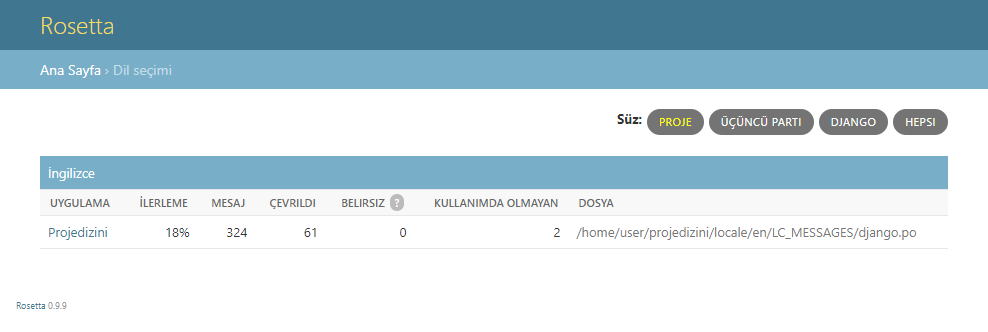
12. Translation Interface with django-rosetta
$ pip install django-rosettaif settings.DEBUG:
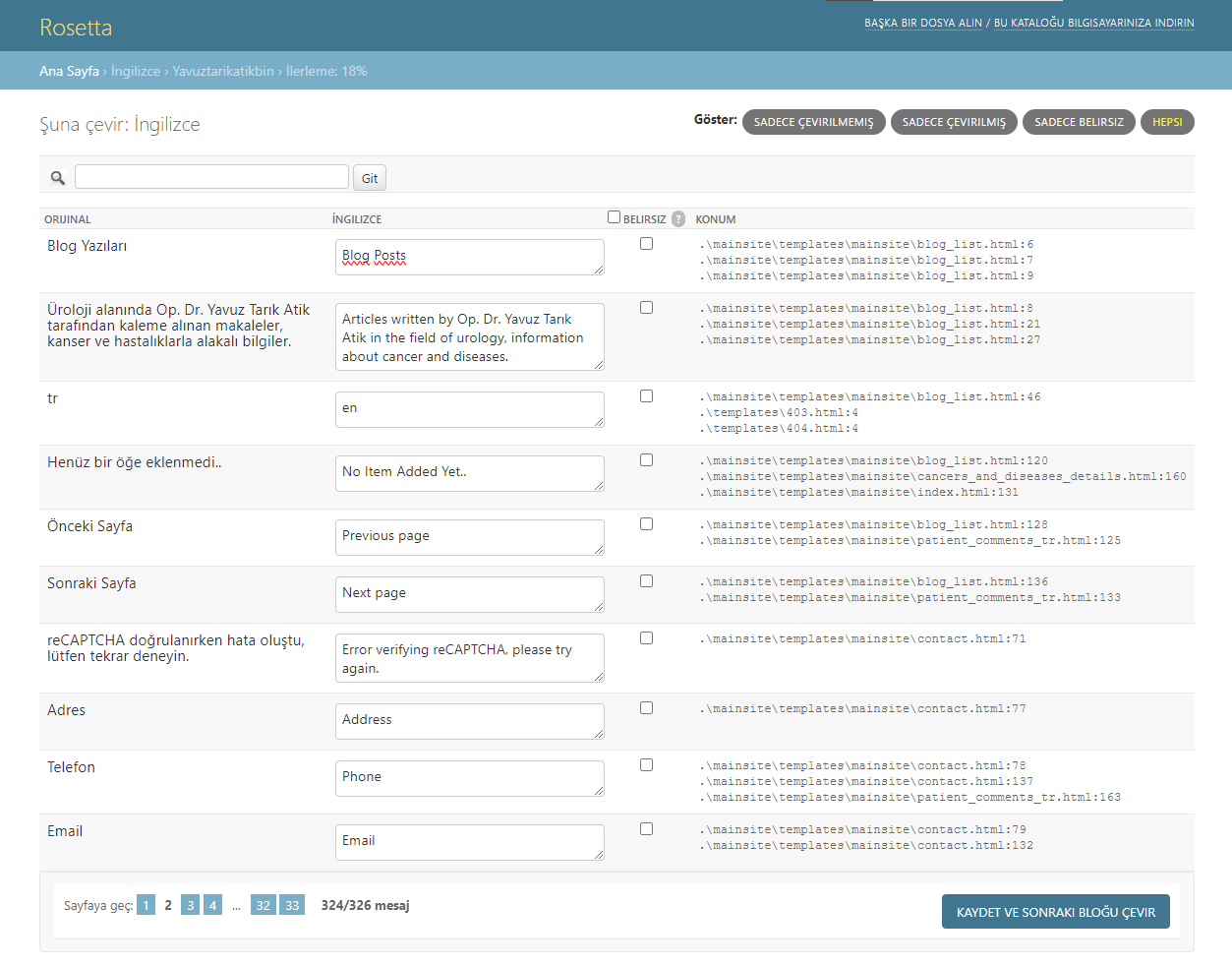
urlpatterns += [path('rosetta/', include('rosetta.urls'))]Rosetta opens a visual .po editor at the /rosetta/ address. It's ideal for working with translators — no terminal commands are needed.
13. SEO with hreflang: Language Signaling
In multilingual sites, the hreflang tag is used to inform Google which page is intended for which language/region. Without it, Google might consider pages in different languages as duplicates:
{% load i18n %}

  {% get_available_languages as LANGUAGES %}
  {% for lang_code, lang_name in LANGUAGES %}

  {% endfor %}
14. Turkish Slug Problem and Solution
Django's default slugify() function does not handle Turkish characters correctly. Letters like ş, ı, ç, ğ, ö, ü are completely omitted:
from django.utils.text import slugify

# PROBLEM: Turkish characters are omitted
slugify('Şeker Fabrikası')  # → 'eker-fabrikas' (incorrect!)

# SOLUTION: Perform character mapping first
TR_MAP = str.maketrans('şŞıİçÇğĞöÖüÜ', 'sSiIcCgGoOuU')

def tr_slugify(text: str) -> str:
    return slugify(text.translate(TR_MAP))

tr_slugify('Şeker Fabrikası')  # → 'seker-fabrikasi' (correct!)
15. Common Parler Error: Language Loss After save()
A common pitfall in AnomixLabs projects: after a save() call, the active language resets and defaults to the base language (usually tr) until the next set_current_language() call. When saving related objects (like InsightFAQ), you need to set the language again:
# INCORRECT — language resets after save()
article.set_current_language('en')
article.title = 'Hello'
article.save()
# Language reverted to 'tr' here!
faq.set_current_language('en')  # ← needs to be set again

# CORRECT — set the language again for each related object
for lang_code in ['tr', 'en']:
    article.set_current_language(lang_code)
    article.title = translations[lang_code]['title']
    article.save()
    faq = InsightFAQ(article=article)
    faq.set_current_language(lang_code)
    faq.question = translations[lang_code]['question']
    faq.save()
16. compilemessages Automation in CI/CD
Be sure to include the compilemessages step in your production deploy pipeline. Otherwise, changes in .po files will not be deployed:
# In GitHub Actions or similar CI
- name: Compile translations
  run: |
    sudo apt-get install -y gettext
    python manage.py compilemessages

# As a Makefile target
translate:
    python manage.py makemessages -l en -l tr
    python manage.py compilemessages
Summary
The Django 5.x multilingual project architecture consists of three layers: gettext + rosetta (UI texts), django-parler (database content), and i18n_patterns (URL structure). hreflang tags are mandatory for SEO. Use the tr_slugify helper function for Turkish slugs. These four components together create a fully scalable, maintainable multilingual platform.
Frequently Questions
What is the fundamental difference between django-parler and gettext? expand_more
What steps are required to add a new language? expand_more
What does prefix_default_language=False do? expand_more
Why is the hreflang tag necessary? expand_more
How is RTL (right-to-left) language support added? expand_more
How is the parler slug conflict problem resolved? expand_more
Can I convert an existing model to TranslatableModel during migration? expand_more
What does the fallback setting in PARLER_LANGUAGES do? expand_more
Ali Kasımoğlu
Full-stack Developer & Founder of AnomixLabs
A software developer specializing in the Python and Django ecosystem. Focuses on modern web architectures, AI integrations, and minimalist user experiences. Under the AnomixLabs umbrella, he aims to transform complex problems into lean and effective digital solutions.