

Last updated: April 2026 · AnomixLabs Technical Team
Mistakes in web design drive users away, confuse search engines, and violate accessibility standards. These five errors are repeatedly seen in the vast majority of projects.
Error 1: Mobile Incompatibility and Mobile-First Neglect
Google has fully mandated mobile-first indexing since 2023: search engines index your site using its mobile version first. This means sites that prioritize desktop-first design will lose visibility on Google.
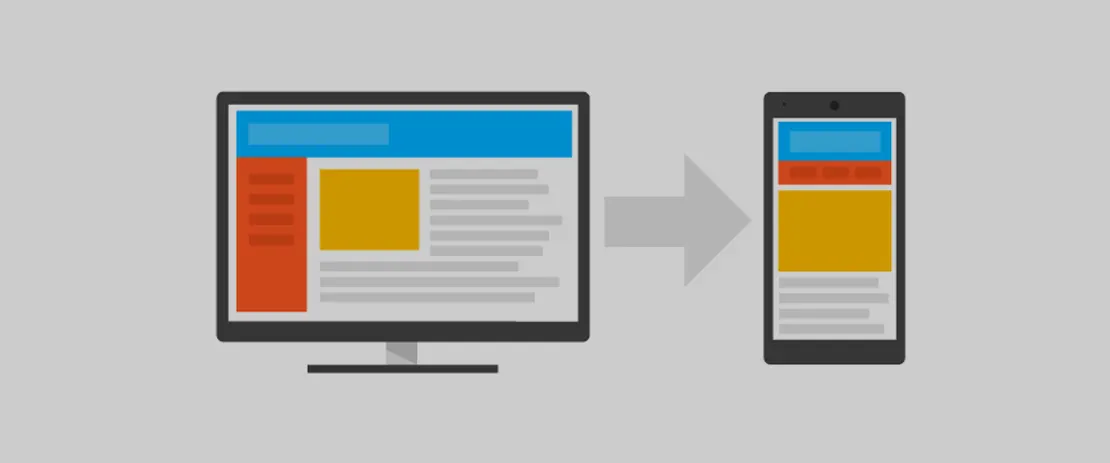
In Turkey, over 75% of internet usage comes from mobile devices (We Are Social 2025). Despite this, desktop-first design is still common in projects audited by AnomixLabs.
Symptoms: Horizontal scrolling appears when opening the page on a phone, buttons are too small to tap with a finger (Google recommends a minimum of 48x48px), text appears too small to read.
Solution: Write CSS with a mobile-first approach — default styles for mobile, media queries for larger screens:
/* Incorrect: desktop-first */
.card { width: 300px; }
@media (max-width: 768px) { .card { width: 100%; } }

/* Correct: mobile-first */
.card { width: 100%; }
@media (min-width: 768px) { .card { width: 300px; } }
Error 2: Slow Page Load and Core Web Vitals Failure
Google's Core Web Vitals metrics are a direct ranking factor. Target values for 2026:
- LCP (Largest Contentful Paint): <2.5s — Loading of the largest visible element
- INP (Interaction to Next Paint): <200ms — Response to user interaction (replaced FID in March 2024)
- CLS (Cumulative Layout Shift): <0.1 — Content shift score
CLS real-world example: An ad banner is inserted into the DOM while the page loads, pushing the content below it down. The content shifts as the user is about to click a link, causing them to click the wrong thing. Solution: Reserve space for the ad container:
/* Space reservation for CLS */
.ad-container {
  min-height: 90px;  /* Reserve banner dimensions in advance */
  width: 100%;
}
Common LCP errors: hero image lazy loading (do not use for above-the-fold), large, unoptimized PNG/JPEGs, render-blocking CSS/JS, slow server response.
<!-- Incorrect: lazy loading for above-the-fold hero -->
<img src="hero.jpg" loading="lazy" alt="Hero">

<!-- Correct: LCP optimization with fetchpriority + preload -->
<link rel="preload" as="image" href="hero.webp"
      imagesrcset="hero-800.webp 800w, hero-1200.webp 1200w"
      imagesizes="100vw">
<img src="hero.webp"
     srcset="hero-800.webp 800w, hero-1200.webp 1200w"
     sizes="100vw"
     fetchpriority="high"
     width="1200" height="750"
     alt="Main visual">
Error 3: Poor Color Contrast and Accessibility Neglect
WCAG 2.1 (Web Content Accessibility Guidelines) AA standard requires a contrast ratio of 4.5:1 for normal text and 3:1 for large text (18px bold or 24px). Meeting these standards is a legal requirement — the European Accessibility Act (EAA) came into effect in 2025.
Common violation: light gray text (#aaaaaa) on a white background. This has a contrast ratio of 2.32:1 — failing both WCAG AA and AAA standards.
/* Incorrect: insufficient contrast */
.subtitle { color: #aaaaaa; background: white; }  /* 2.32:1 */

/* Correct: WCAG AA compliant */
.subtitle { color: #767676; background: white; }  /* 4.54:1 - fully compliant */
Accessibility tools: browser DevTools Accessibility panel, WebAIM Contrast Checker (webaim.org/resources/contrastchecker/), Lighthouse accessibility audit, axe DevTools browser extension.
Additional accessibility issues: missing alt text for images (critical for screen readers), missing form labels, broken keyboard navigation, insufficient focus indicators.
Error 4: Poor Typography and Readability Issues
Typography is one of the most neglected yet impactful elements of web design. The most common typography errors in AnomixLabs projects are:
- Font size too small: 12-13px body text — 16px is recommended as a minimum (especially on mobile)
- Insufficient line height: line-height: 1.2 — 1.5-1.6 is recommended for readability
- Line length too wide: full-width paragraphs at 900px width — a max-width of 65-75 characters is ideal
- Font loading performance: using font-display: block leads to FOUT/FOIT issues
/* Typography best practices */
body {
  font-size: 16px;       /* minimum */
  line-height: 1.6;      /* readability */
}

.content p {
  max-width: 70ch;       /* ~70 character width */
}

@font-face {
  font-display: swap;    /* To prevent FOUT */
}
Error 5: Meaningless HTML and Lack of Semantics
Buttons created with divs and spans, pages without heading hierarchy, lists made with spans — semantic HTML errors affect SEO, accessibility, and performance.
<!-- Incorrect: clickable element with div/span -->
<div onclick="submitForm()" class="btn">Send</div>
<span onclick="submitForm()">Send</span>

<!-- Correct: semantic button -->
<button type="submit">Send</button>

<!-- Incorrect: no heading hierarchy -->
<div class="page-title">Site Title</div>
<div class="subtitle">Sub-section</div>

<!-- Correct: semantic heading structure -->
<h1>Site Title</h1>
<h2>Section</h2>
<h3>Sub-section</h3>
Benefits of semantic HTML: screen readers interpret the page correctly, Google understands content hierarchy, browser default styles and behaviors can be utilized.
Audit Process with Lighthouse
Google Lighthouse (Chrome DevTools > Lighthouse tab or CLI) provides audits in four categories:
- Performance: Core Web Vitals + overall speed score
- Accessibility: WCAG violations, missing ARIA, label issues
- Best Practices: HTTPS, modern API usage, security
- SEO: meta description, canonical, robots.txt, crawlability
Aim for a score of 90+ in each category. The mobile audit is particularly important — it usually scores 15-20 points lower than desktop.
Image Optimization
Unoptimized images are the biggest enemy of LCP:
- Format: WebP (30% smaller than PNG, 25-35% smaller than JPEG); modern browsers also support AVIF
- Sizing: different resolutions based on screen size with srcset
- Lazy loading: loading='lazy' for images outside the above-the-fold area
- Alt text: descriptive alt text with keywords for every image
Summary
These five errors individually cause serious problems, but when found together, they doom a web project to failure. Start with a Lighthouse audit — it's free, comprehensive, and provides prioritization. Make it a routine to run an audit before every major feature development.
Frequently Questions
Is a Lighthouse score of 100 mandatory? expand_more
Why does accessibility matter for a backend developer? expand_more
Why is the viewport meta tag mandatory? expand_more
Does CSS-in-JS affect performance? expand_more
Should I prefer AVIF over WebP for images? expand_more
Why is CLS higher on mobile than desktop? expand_more
What is the real harm in using div instead of button? expand_more
Ali Kasımoğlu
Full-stack Developer & Founder of AnomixLabs
A software developer specializing in the Python and Django ecosystem. Focuses on modern web architectures, AI integrations, and minimalist user experiences. Under the AnomixLabs umbrella, he aims to transform complex problems into lean and effective digital solutions.