Last updated: April 2026 · AnomixLabs Engineering Team
In Python, everything is an object. Knowing whether these objects are mutable or immutable protects against unexpected bugs and performance issues — and helps you write better Python code.
1. Object Identity: Seeing with `id()`
Every object in Python has a unique identity (its memory address). When immutable objects are 'changed', a new object is created, while mutable objects retain the same identity:
x = 42
print(id(x))    # e.g.: 140234567890
x = x + 1
print(id(x))    # DIFFERENT id — new object created

my_list = [1, 2, 3]
print(id(my_list))  # e.g.: 140234599999
my_list.append(4)
print(id(my_list))  # SAME id — object modified, identity unchanged
2. CPython Integer Interning
CPython pre-creates and caches (interns) integers between -5 and 256. Numbers in this range share the same object on each use:
a = 100; b = 100
print(a is b)    # True — same object (interned)

a = 1000; b = 1000
print(a is b)    # False — different objects (>256)

# This is why you should use == for integer comparison, not is
# The 'is' operator is for identity comparison, not value
3. Immutable Types
Once created, their contents cannot be changed. Any 'modification' creates a new object:
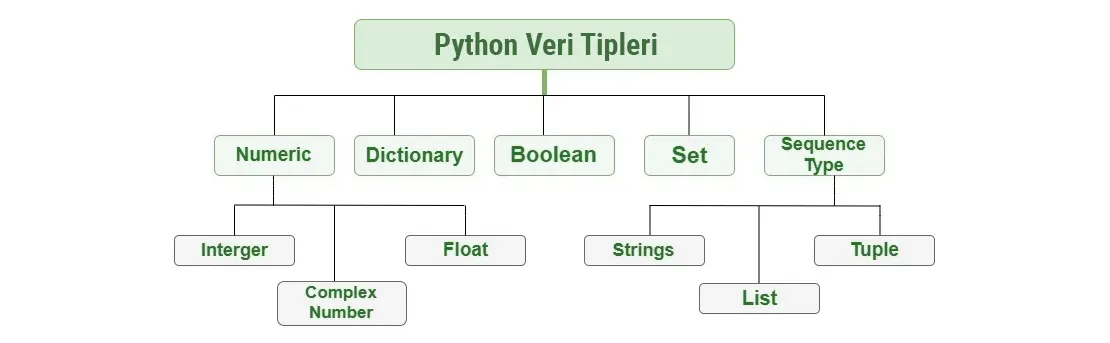
# int, float, complex, bool
n = 10           # immutable int
b = True         # bool, subclass of int

# str — characters cannot be changed
s = 'hello'
s[0] = 'H'       # TypeError!

# tuple — elements cannot be changed
t = (1, 2, 3)
t[0] = 99        # TypeError!

# frozenset — immutable version of set
fs = frozenset({1, 2, 3})
fs.add(4)        # AttributeError!

# bytes — immutable version of bytearray
b = b'hello'
b[0] = 72        # TypeError!
4. Mutable Types
# list
l = [1, 2, 3]
l.append(4)     # [1, 2, 3, 4] — same object
l[0] = 99       # [99, 2, 3, 4] — same object

# dict
d = {'name': 'Alice'}
d['age'] = 30   # {'name': 'Alice', 'age': 30}

# set
s = {1, 2, 3}
s.add(4)        # {1, 2, 3, 4}

# bytearray — mutable bytes
ba = bytearray(b'hello')
ba[0] = 72      # bytearray(b'Hello')
5. Critical Pitfall: Mutable Default Arguments
One of Python's most common sources of bugs. Using a mutable default argument in a function definition creates a single object shared across all calls:
# WRONG — created once in function definition, shared!
def add_item(item, my_list=[]):
    my_list.append(item)
    return my_list

print(add_item(1))  # [1]
print(add_item(2))  # [1, 2]  ← Surprise!
print(add_item(3))  # [1, 2, 3]  ← Still the same list!

# CORRECT — default with None
def add_item_correct(item, my_list=None):
    if my_list is None:
        my_list = []
    my_list.append(item)
    return my_list
6. Shallow Copy vs. Deep Copy
import copy

original = [[1, 2], [3, 4]]

# Shallow copy — inner lists are shared!
shallow = original.copy()  # or original[:]
shallow[0].append(99)
print(original[0])  # [1, 2, 99] ← Affected!

# Deep copy — completely independent copy
original2 = [[1, 2], [3, 4]]
deep = copy.deepcopy(original2)
deep[0].append(99)
print(original2[0])  # [1, 2] ← Not affected
7. Memory Usage Comparison
import sys

# list vs tuple memory size (Python 3.12)
my_list = [1, 2, 3, 4, 5]
my_tuple = (1, 2, 3, 4, 5)

print(sys.getsizeof(my_list))   # 120 bytes
print(sys.getsizeof(my_tuple))  # 80 bytes  ← 33% smaller

# Memory optimization with __slots__
class Normal:
    def __init__(self, x, y):
        self.x = x
        self.y = y

class Optimized:
    __slots__ = ['x', 'y']
    def __init__(self, x, y):
        self.x = x
        self.y = y

# When creating thousands of instances, __slots__ saves ~50% memory
8. Python 3.10+ Type Hints
# Python 3.10+ — union type with | operator
def process(value: int | str) -> str:
    return str(value)

# list, dict, tuple type hints (built-in since 3.9)
names: list[str] = ['Alice', 'Alice']
score_board: dict[str, int] = {'Alice': 95}

# Python 3.12 — type alias syntax
type Vector = list[float]
type Matrix = list[Vector]

def dot_product(v1: Vector, v2: Vector) -> float:
    return sum(a * b for a, b in zip(v1, v2))
9. Walrus Operator (:=) — Python 3.8+
# Assignment expression — assign and use in condition
while chunk := file.read(8192):
    process(chunk)

# Avoid repeated computation in list comprehension
results = [y for x in data if (y := compute(x)) > 0]

# Common use with re.match
import re
if m := re.match(r'(\d+)-(\d+)', text):
    start, end = m.group(1), m.group(2)
10. Match Statement — Python 3.10+
def http_message(code: int) -> str:
    match code:
        case 200: return 'OK'
        case 404: return 'Not Found'
        case 500: return 'Server Error'
        case _: return 'Unknown'

# Structural pattern matching
def process_command(command):
    match command:
        case {'action': 'add', 'item': item}:
            return f'{item} added'
        case {'action': 'remove', 'item': item}:
            return f'{item} removed'
        case _:
            return 'Unknown command'
11. dataclass, TypedDict, and frozen
from dataclasses import dataclass, field
from typing import TypedDict

# dataclass — automatic __init__, __repr__, __eq__
@dataclass
class User:
    name: str
    age: int
    roles: list[str] = field(default_factory=list)

# frozen=True — immutable dataclass (hashable)
@dataclass(frozen=True)
class Coordinate:
    x: float
    y: float
    # x = 5 → FrozenInstanceError!

# TypedDict — type safety for dicts
class Movie(TypedDict):
    title: str
    year: int
    rating: float
Summary
Immutable: int, float, complex, bool, str, bytes, tuple, frozenset — hashable, can be used as dict keys, thread-safe.
Mutable: list, dict, set, bytearray — change in place, cannot be used as dict keys.
In modern Python: type-safe data structures with dataclass, dict guarantees with TypedDict, clean conditional logic with match, fluent expressions with the walrus operator :=, memory optimization with __slots__.
Frequently Questions
Why is a tuple faster than a list? expand_more
What is the difference between dataclass and NamedTuple? expand_more
Is everything really an object in Python? expand_more
Should I prefer list comprehension or a generator? expand_more
When is frozenset used? expand_more
TypedDict vs dataclass: when to use which? expand_more
Why is the Python 3.12 type alias syntax important? expand_more
Ali Kasımoğlu
Full-stack Developer & Founder of AnomixLabs
A software developer specializing in the Python and Django ecosystem. Focuses on modern web architectures, AI integrations, and minimalist user experiences. Under the AnomixLabs umbrella, he aims to transform complex problems into lean and effective digital solutions.